Text input
id — text, caret, horizontal scroll — so an app’s render stays a pure
description of what it wants on screen, and a keystroke never has to walk
back through app state to become a pixel.
Everything here lives in packages/core/src/mjsx.js: the t === 'input'
branch of draw(), and UI.key / UI.type / UI._editKey /
UI._inputStroke / the focus* family on UI. Snippets are lifted from
there and from examples/input/app.jsx.
For the keyboard that usually sits below the field, see keyboards.md.
Contents
Section titled “Contents”- The field
- Prop reference
- State the engine owns, keyed by
id - Controlled and uncontrolled
- The caret: tap, drag, hold-drag
- Overflow, and the view that follows the caret
password,maxLen,placeholderonChangeandonSubmit- Focus: order, Tab, arrows, scroll-into-view
exclusive, and the mirror- The unified key path
- Worked example: a custom keyboard
- Host hooks
- Where each behaviour lives
The field
Section titled “The field”<input id="name" size={2} placeholder="tap to type" />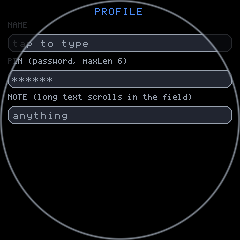
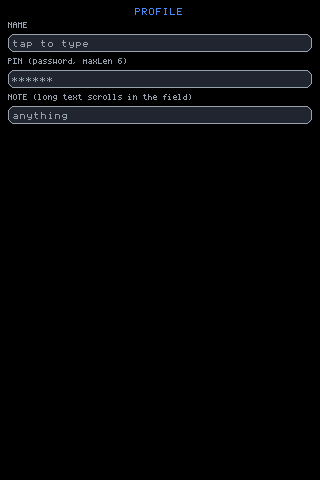
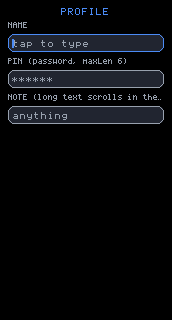
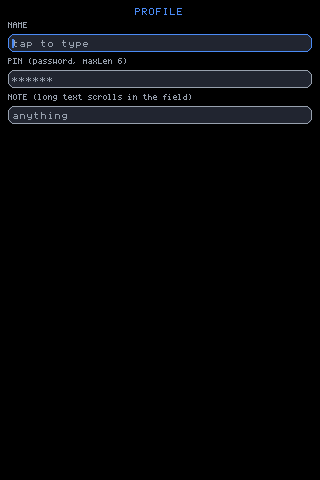
The whole page above is seven nodes:
h('box', { h: gfx.height(), pad: em(1), gap: em(0.75) }, [ h('text', { text: 'PROFILE', size: 2, align: 'center', color: UI.theme.accent }), h('text', { text: 'NAME', size: 1, color: UI.theme.muted }), h('input', { id: 'name', size: 2, placeholder: 'tap to type' }), h('text', { text: 'PIN (password, maxLen 6)', size: 1, color: UI.theme.muted }), h('input', { id: 'pin', size: 2, password: true, maxLen: 6, placeholder: '******' }), h('text', { text: 'NOTE (long text scrolls in the field)', size: 1, color: UI.theme.muted }), h('input', { id: 'note', size: 2, placeholder: 'anything' })])Prop reference
Section titled “Prop reference”| Prop | Default | Meaning |
|---|---|---|
id | '_input' | The key its state is stored under. Two nodes with the same id are the same field. |
size | 1 | Text size. Drives the field’s whole height. |
value | — | Present makes the field controlled: the app owns the text. |
defaultValue | '' | Initial text for an uncontrolled field, read once. |
placeholder | — | Muted text drawn when the field is empty. |
password | falsy | Mask every character with *. |
maxLen | — | Refuse inserts at this length. |
onChange(text) | — | Fired when the text actually changed. |
onSubmit(text) | — | Fired by Enter, which then blurs. |
label | — | Not drawn by the field. Carried for the full-display keyboard’s header. |
exclusive | falsy | Ask the keyboard to take the whole display while this field has focus. |
focusable | true | false keeps the field out of the focus order. |
w | fills | Fixed width, used only when narrower than what is available. |
pad | max(4, floor((flh(size) + 2) / 3)) | Inner padding; also sets the field’s height. |
bg | UI.theme.key | Fill. |
border | UI.theme.muted | Unfocused border. Focused is always UI.theme.accent. |
color | UI.theme.text | Text colour. |
Height is derived, never passed:
var isz = p.size || 1;var ilh = flh(isz) + 2;var ipd = p.pad === undefined ? Math.max(4, Math.floor(ilh / 3)) : p.pad;var ih = ilh + ipd * 2;The same three lines run in measure(), so a field reports its height
without being drawn.
State the engine owns, keyed by id
Section titled “State the engine owns, keyed by id”On first draw the field allocates a record in UI._inputs:
var iid = p.id || '_input';var ist = UI._inputs[iid];if (!ist) { ist = UI._inputs[iid] = { text: p.value !== undefined ? String(p.value) : (p.defaultValue === undefined ? '' : String(p.defaultValue)), cur: 1e9, sx: 0, bt: 0, follow: 1 };}if (p.value !== undefined) ist.text = String(p.value);ist.p = p;text— the current string (uncontrolled fields only; a controlled field has it overwritten every render).cur— caret index. Starts at1e9and is clamped to the text length on first draw, so a field created with text starts with the caret at the end.sx— horizontal scroll within the field.bt— the blink epoch, reset on every edit so the caret is solid the instant you type.follow— whether the view chases the caret. A deliberate drag-scroll clears it.p— the props from the last draw. This is what letsUI._editKeyseemaxLenandonSubmit, and what the full-display keyboard’s mirror copies from.
Because the record is keyed by id and not by node identity, two input
nodes sharing an id are one field — the mirror
depends on exactly this. UI.mount() clears _inputs and _focus, so a
pushed bundle starts clean.
Controlled and uncontrolled
Section titled “Controlled and uncontrolled”Passing value makes the field controlled: the engine stops owning the
text and copies yours in on every render. You then need onChange to keep
it moving.
<input id="ssid" value={UI.state.ssid} onChange={function (v) { UI.set({ ssid: v }); }} />Omit value and the field is uncontrolled — the engine keeps the text, and
onChange / onSubmit are notifications rather than a required loop. This
is what every example does, because it means typing never dirties app state
and never rebuilds the form. From examples/input/app.jsx:
/* The whole form reuses across frames: focus borders, carets and typed text are all DRAW-time reads, so typing and tabbing never rebuild it -- only the chip selections and the submit line do. */var form = UI.memo('inputForm', [kb, pos, UI.state.last], function () { ... });Read the text of an uncontrolled field at submit time, from the argument:
onSubmit={function (v) { UI.set({ last: p.label + ': ' + v }); }}The caret: tap, drag, hold-drag
Section titled “The caret: tap, drag, hold-drag”A field registers one whole-stroke handler, not a set of gestures. What the
stroke meant is classified at the moment the finger leaves the tap slop,
by the dominant axis — UI._inputStroke:
| Stroke | Mode | Effect |
|---|---|---|
Stayed within 6px (DRAG_SLOP) | 0 → tap | Focus the field and place the caret where the finger landed. |
| Held 400ms, then moved | 2 | Focus, then walk the caret under the finger. |
| Mostly vertical, inside a scroll zone | 3 | Hand the stroke to the zone — fling included. The field is not focused. |
| Mostly horizontal, text overflows | 1 | Scroll the field’s own text sideways. follow clears. |
| Mostly horizontal, text fits | 2 | Focus and place the caret. |
if (g.mode === 0) { if (sys.millis() - g.t0 >= 400) { g.mode = 2; self.focus(iid); } else if (dxs > DRAG_SLOP || dxs < -DRAG_SLOP || dys > DRAG_SLOP || dys < -DRAG_SLOP) { var ax = dxs < 0 ? -dxs : dxs, ay = dys < 0 ? -dys : dys; if (ay > ax && zn) g.mode = 3; else if (st.text.length * gm.adv > gm.w - gm.pad * 2) g.mode = 1; else { g.mode = 2; self.focus(iid); } }}Two consequences worth stating plainly:
- A form full of fields still scrolls, wherever the finger lands. A vertical drag that starts on a field is a scroll, not a focus.
- Focus happens on tap or hold only. A scroll passing over a field must not focus it and summon a keyboard.
Placing the caret is arithmetic on the advance width, clamped to the text:
function place() { var ci = Math.round((lx - gm.pad + st.sx) / gm.adv); var n = st.text.length; st.cur = ci < 0 ? 0 : (ci > n ? n : ci); st.bt = sys.millis(); st.follow = 1;}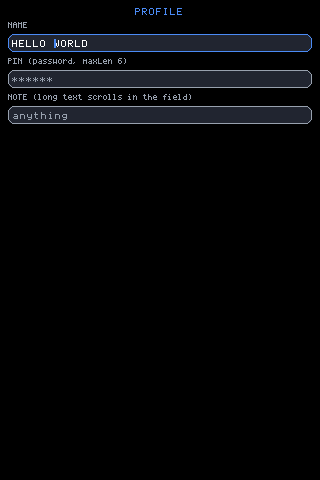
The caret five positions back from the end of HELLO WORLD — here by five
ArrowLeft presses, identically reachable by tapping between two glyphs.
The next character typed is inserted there, not appended.
Overflow, and the view that follows the caret
Section titled “Overflow, and the view that follows the caret”Text longer than the field scrolls inside it. The view chases the caret while the caret is what last moved:
if (ifoc && ist.follow) { if (icx - ist.sx > innW - iadv) ist.sx = icx - innW + iadv; if (icx - ist.sx < 0) ist.sx = icx;}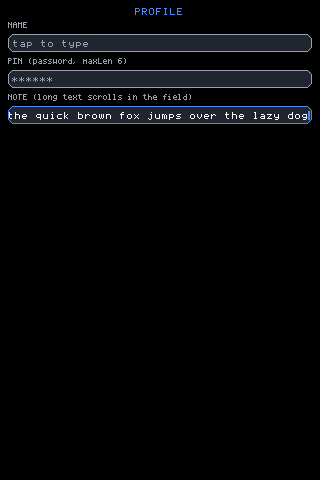
A sentence longer than the field. The end is shown because the caret is
there; the start has scrolled out to the left. A horizontal drag clears
follow, so the view is not yanked back the moment you look at the
beginning.
Drawing is clipped to the field’s inner rect, and the text is centred on its cap-ink height rather than its line box:
/* odd remainder goes ABOVE the text: caps carry their visual weight high, so erring low reads as centred while erring high reads as floating -- and the field's own border makes a high bias obvious */var ity = y + Math.ceil((ih - fink(isz)) / 2);password, maxLen, placeholder
Section titled “password, maxLen, placeholder”<input id="pin" size={2} password={true} maxLen={6} placeholder="******" />password masks at draw time only — the real string is what onChange and
onSubmit see, and the caret tracks the real length:
var shown = ist.text;if (p.password) { var msk = ''; for (var mi = 0; mi < shown.length; mi++) msk += '*'; shown = msk;}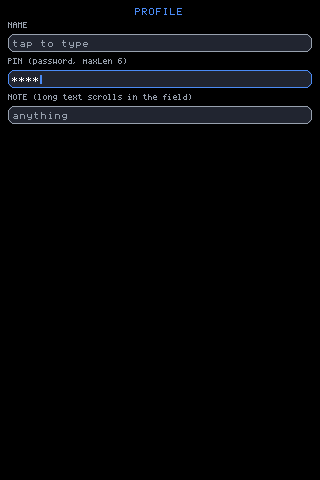
password={true}: four characters typed, four asterisks, caret after
them.
maxLen refuses the insert and nothing else — the keystroke is still
consumed by the editor, so it does not leak through to UI.onKey:
if (k.length === 1) { if (!(pp.maxLen && v.length >= pp.maxLen)) { nv = v.slice(0, c) + k + v.slice(c); st.cur = c + 1; }}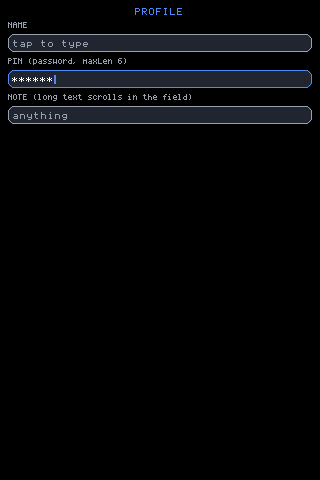
maxLen: 6 after fourteen keystrokes. The field holds six characters; the
other eight changed nothing.
placeholder draws in UI.theme.muted, and only when there is nothing to
show — note it tests the masked string, so a password field’s placeholder
disappears on the first character:
if (!shown.length && p.placeholder) { gfx.text(x + ipd, ity, isz, UI.theme.muted, p.placeholder);}onChange and onSubmit
Section titled “onChange and onSubmit”onChange(text) fires only when the text actually changed — caret moves,
focus walks and blocked maxLen inserts do not call it:
if (nv !== null) { st.text = nv; if (pp.onChange) pp.onChange(nv);}onSubmit(text) is Enter, and Enter also blurs:
else if (k === 'Enter') { if (pp.onSubmit) pp.onSubmit(st.text); this.blur(); return true;}Escape blurs without submitting.
Because a submit is just the Enter key, any control can raise one. From
examples/wifi/app.jsx, a JOIN button that submits the field beside it:
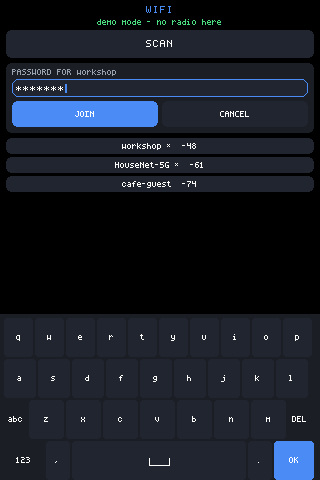
<input id="psk" size={2} password={true} placeholder="password" onSubmit={function (v) { join(picking, v); }} /><row gap={em(0.5)}> <Button label="JOIN" size={1} bg={UI.theme.accent} onTap={function () { UI.key('press', 'Enter'); }} /> <Button label="CANCEL" size={1} onTap={function () { UI.blur(); UI.set({ picking: null }); }} /></row>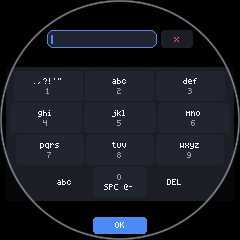
Focus: order, Tab, arrows, scroll-into-view
Section titled “Focus: order, Tab, arrows, scroll-into-view”UI.focus(id), UI.blur() and UI.focused() are the whole app-facing
surface. focus() resets the blink, re-enables follow, clamps the caret,
honours the field’s exclusive prop and queues a reveal:
focus: function (id) { if (this._focus === id) return; this._focus = id; this._exclusive = false; var st = this._inputs[id]; if (st) { st.bt = sys.millis(); st.follow = 1; if (st.cur > st.text.length) st.cur = st.text.length; if (st.p && st.p.exclusive) this._exclusive = true; } this._reveal = id; this._dirty = true; if (this.onFocusChange) this.onFocusChange(id);}Order is content order, not paint order. Every field records where it drew, in content coordinates — screen y plus its scroll zone’s offset — so a field scrolled out of sight keeps a stable position in the cycle:
if (p.focusable !== false) { ist.nav = { zone: UI._curZone || null, cy: y + (UI._curZone ? (UI._scroll[UI._curZone] || 0) : 0), h: ih, seen: UI._frame }; UI._focusables.push(iid);}focusNext(dir) collects every field whose home still exists — a
zone-owned field qualifies while its zone does, a fixed one while it drew
this frame — sorts by nav.cy and wraps. Tab and shift-Tab step it;
ArrowUp/ArrowDown do too. Either can be switched off, and the key then
falls through to UI.onKey for the app to use:
/* Which keys walk the focus order while an input holds focus. Both on by default; an app that needs Tab or the vertical arrows for itself turns the flag off and the key falls through to UI.onKey instead -- as does ANY key the editor has no meaning for. */focusNav: { tab: true, arrows: true },Reaching a field below the fold works, because _revealFocus() runs
after the render and solves for the scroll offset that puts the field a
small margin inside the visible part of its zone — where “visible” already
excludes whatever UI.inset() says an overlay is covering:
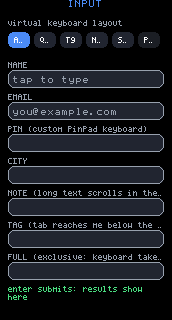
var visTop = z.y > this._insetTop() ? z.y : this._insetTop();var gh = gfx.height() - this._insetBot();var visBot = z.y + z.h < gh ? z.y + z.h : gh;examples/input/app.jsx has a field labelled exactly for this:
<Field id="tag" label="TAG (tab reaches me below the fold)" />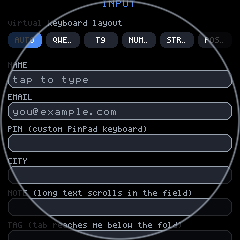
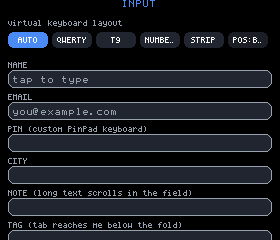
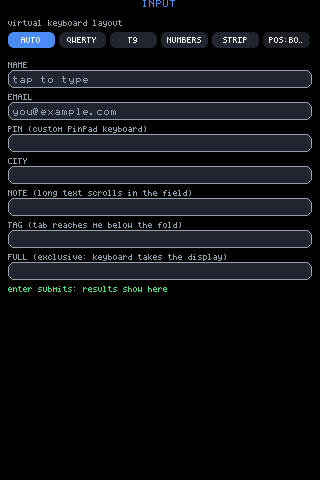
focusable={false} opts a field out of the cycle entirely. The
full-display keyboard’s mirror uses it, so a takeover does not double every
field in the order.
exclusive, and the mirror
Section titled “exclusive, and the mirror”exclusive on a field asks the keyboard to take the whole display while
that field has focus:
<Field id="full" label="FULL (exclusive: keyboard takes the display)" exclusive={true} />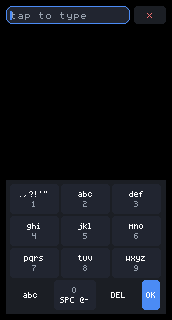
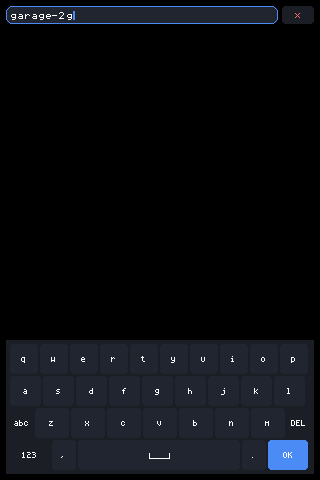
The engine also sets the flag itself, in two situations, both of which mean no amount of scrolling can help:
/* A fixed field is visible where it is or not at all: if an overlay covers it, the only way to type into it is the exclusive full-display keyboard with its mirror. */if (st.nav.cy < this._insetTop() || st.nav.cy + st.nav.h > gfx.height() - this._insetBot()) { if (!this._exclusive) { this._exclusive = true; this._dirty = true; }}and, for a field inside a zone, when the overlay leaves less viewport than the field is tall. (The keyboard has a third trigger of its own — keys under 30px — described in keyboards.md.)
UI.exclusive() reports the result, so a custom keyboard can honour it too:
exclusive: function () { return !!(this._exclusive && this._focus); },The mirror is not a copy. The takeover draws a second input node with
the same id, which by the rule at the top of this page makes it the same
field — same text, same caret, same handlers, pulled from the props the
original stashed in ist.p:
h('input', { id: UI._focus, size: xsz, password: xp.password, maxLen: xp.maxLen, placeholder: xp.placeholder, label: xp.label, value: xp.value, onChange: xp.onChange, onSubmit: xp.onSubmit, focusable: false })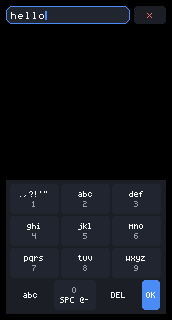
Typed into the mirror; the original already has it. There is no synchronisation step to get wrong because there are not two states.
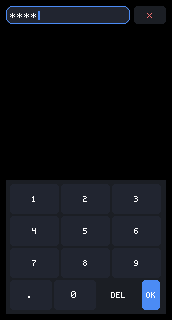
password travels with it, so a masked field stays masked in the
takeover.
label exists for this path. The field itself never draws it — it is
carried so the keyboard’s opt-in header has something to title the
takeover with, falling back to placeholder.
The unified key path
Section titled “The unified key path”Every keystroke reaches a field the same way, whatever produced it: a
physical keyboard, the built-in Keyboard, a host’s native OSK outside the
JS VM, or an app’s own JSX. There is one entry point, and it is not
input-specific:
key: function (type, key) { /* A focused input consumes the keyboard: presses edit it, and none of the stroke reaches UI.onKey -- an app shortcut must not fire off a character someone was typing into a field. */ if (this._focus && this._inputs[this._focus]) { if (type === 'press' && !this._editKey(key) && this.onKey) this.onKey(type, key); return; } if (this.onKey) this.onKey(type, key);}So: while a field is focused, down and up are swallowed outright, and a
press goes to the editor first. Only if the editor has no meaning for
that key does it reach UI.onKey — which is how an app keeps its own
shortcuts without stealing characters from someone mid-word.
What the editor claims:
| Key | Effect |
|---|---|
| any single character | Insert at the caret, unless maxLen is reached. |
Backspace | Delete before the caret. |
Delete | Delete after the caret; the caret does not move. |
ArrowLeft / ArrowRight | Move the caret one character. |
Home / End | Caret to start / end. |
Tab / ShiftTab | Next / previous field, if focusNav.tab. |
ArrowUp / ArrowDown | Next / previous field, if focusNav.arrows. |
Enter | onSubmit(text), then blur. |
Escape | Blur. |
| anything else | Not claimed — falls through to UI.onKey. |
Key names are a browser’s own KeyboardEvent.key strings. Nothing
translates them on the way in; "Enter", "ArrowUp" and "a" arrive
unchanged, and mjsx-core does not interpret keys at all beyond the table
above.
UI.type(str) is the literal-text shortcut, and it goes straight to the
editor — no UI.onKey fallthrough, because a literal character has nothing
to fall through to:
type: function (str) { for (var i = 0; i < str.length; i++) this._editKey(str.charAt(i));},Use UI.type("...") for characters and UI.key('press', name) for named
keys. That is the entire contract a keyboard has to meet.
Worked example: a custom keyboard
Section titled “Worked example: a custom keyboard”PinPad in examples/input/app.jsx is the whole story. It is a component
that returns boxes. It registers nothing, implements no interface, and the
engine has never heard of it:
/* A user-supplied keyboard: plain JSX, no registration. Digits go in with UI.type, the rest are the same named keys a physical board sends. */function PinPad() { var rows = [['1', '2', '3'], ['4', '5', '6'], ['7', '8', '9'], ['DEL', '0', 'OK']]; var kids = []; for (var r = 0; r < rows.length; r++) { var ks = []; for (var c = 0; c < 3; c++) { ks.push(h(Button, { label: rows[r][c], size: 2, pad: em(0.75), bg: rows[r][c] === 'OK' ? UI.theme.accent : rows[r][c] === 'DEL' ? UI.theme.panel : UI.theme.key, onTap: (function (k) { return function () { if (k === 'DEL') UI.key('press', 'Backspace'); else if (k === 'OK') UI.key('press', 'Enter'); else UI.type(k); }; })(rows[r][c]) })); } kids.push(h('row', { gap: 2 }, ks)); } return h('box', { bg: UI.theme.panel, pad: 4, gap: 2 }, kids);}The app picks it per field, on focus:
if (focused) { kids.push(focused === 'pin' ? h(PinPad, {}) : h(Keyboard, { layout: kb, position: pos, height: Math.floor(gfx.height() / 2.6) }));}Everything still works because nothing was special-cased: DEL repeats the
same Backspace a physical board sends, OK fires the field’s onSubmit
by sending Enter, and the digits insert at the caret and respect the
field’s maxLen: 6.
If a custom keyboard overlays the page rather than flowing inline, it
should do the two things the built-in one does: set shield: true on its
panel so a press between keys does not fall through, and call
UI.inset('bottom', px) while it is on screen so scroll-into-view keeps
revealed fields clear of it.
Host hooks
Section titled “Host hooks”UI.onFocusChange is called with the focused field’s id, or null on
blur:
/* Host hook: called with the focused input's id (or null on blur). This is how a host that can present its own keyboard -- a browser focusing a real <input> to summon the phone's, native code outside the JS VM drawing one -- knows when to show and hide it. */onFocusChange: null,A host that presents its own keyboard wires this and then feeds characters
back through UI.key('press', ...). From the field’s point of view nothing
is different — which is the point of there being one road in.
Where each behaviour lives
Section titled “Where each behaviour lives”All in packages/core/src/mjsx.js:
| Behaviour | Where |
|---|---|
| Drawing, geometry, placeholder, mask, caret | the t === 'input' branch of draw() |
| Height without drawing | the t === 'input' branch of measure() |
| Per-id state records | UI._inputs |
| Tap / drag / hold-drag classification | UI._inputStroke() |
| Key semantics | UI._editKey() |
| The single key entry point | UI.key(), UI.type() |
| Focus and the focus order | UI.focus(), UI.blur(), UI.focused(), UI.focusNext(), UI.focusPrev(), UI.focusNav |
| Scroll-into-view and auto-exclusive | UI._revealFocus(), UI.exclusive() |
| Overlay bookkeeping | UI.inset(), UI._insetTop(), UI._insetBot() |
| Host notification | UI.onFocusChange |