Figures that carry their own source
headlessly by the repo’s own pure-js backend. Each one also carries, in the PNG itself, two things a screenshot normally throws away: how it was made, and the frame as draw calls rather than as pixels.
bun scripts/shoot.mjs <name> <profile> <app.jsx|-e "code"> [options]bun scripts/shot-info.mjs <shot.png> # the recipebun scripts/shot-info.mjs <shot.png> --replay out.png --scale 4The recipe
Section titled “The recipe”A screenshot with no record of its own making is a dead end: a year later
nobody knows which board, which example, or which tap produced it. So
shoot.mjs writes a mjsx-shot text chunk holding the profile, the
source file, the interactions, and any free-text --note, plus the exact
command that would make it again.
$ bun scripts/shot-info.mjs docs/img/shape-input-round128-round128.png note the input example with a field focused; look at the keyboard the width bought, and on round glass the trapezoid rows and OK in the bottom arc profile round128 240x240 round source examples/input/app.jsx actions [{"op":"tap","x":120,"y":110}] reproduce bun scripts/shoot.mjs input-round128 round128 \ examples/input/app.jsx --tap 120,110 ops 100 draw callsThat is this picture, and the last line is the command that made it:
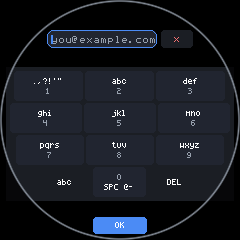
Pass --note when the shot needs a reason: what to look at, why this
profile, what was being demonstrated. It costs nothing and it is the part
that will not be obvious later.
The ops
Section titled “The ops”The engine is only ten calls wide, so a frame can be kept as the list of
those calls instead of the bitmap they produced. That list goes into a
mjsx-ops chunk, compressed, alongside the image.
Why bother, when the picture is right there: the ops are resolution-independent. Replaying at 4x redraws the text with a 4x font rather than magnifying a small one, so a figure captured at 240x240 can be re-rendered crisp at any size the documentation needs.
$ bun scripts/shot-info.mjs docs/img/kb-qwerty-lcd35.png --replay big.png --scale 4replayed 214 ops at 4x -> big.png 1280x1920Both chunks are ordinary PNG text chunks. Every viewer ignores the ones it
does not recognise, so these stay ordinary PNGs — and a browser can read
them back with fetch plus a little chunk parsing (DecompressionStream
inflates the compressed variant), which keeps the single-file property:
the picture and its source travel together.
The format is documented in packages/core/src/oprec.js. It is the same
recorder the HTTP mirror has always used to stream a device’s screen to a
browser — one implementation, so the two cannot drift.
Overlays, and what a figure actually stores
Section titled “Overlays, and what a figure actually stores”Two chunks go into a figure, and a third was tried and dropped.
mjsx-ops is the rich one. A debug overlay is drawn from it
(oprec.boxes()), so the boxes cannot fall out of date with the picture,
and the ops carry far more than boxes: which colour drew each shape, what
the text said, whether a rectangle was really a rect or a clip. Anything
an overlay learns to show later — text colour, shape kind — is already in
there.
mjsx-overlay is the rendered overlay as a second image. Embedding one
image inside another PNG is a real technique: Fireworks kept an entire
second document in its PNGs, and PNG’s private ancillary chunks make it
perfectly legal, since a decoder that does not know a chunk skips it. It
costs about 25% (139 kB across the 126-figure set) and it earns that as
archive safety — it is the one form that still works if the op format
ever moves on and old ops stop being interpretable.
The third thing, a chunk of derived rectangles, was measured and removed.
On kb-qwerty-lcd35.png:
| deflated | |
|---|---|
| the overlay as an RGB image | 1251 bytes |
| the same overlay as coordinates | 244 bytes |
| the ops chunk already in the file | 1267 bytes — contains all of it |
The coordinates are the cheapest, but they are a lossy summary: a flat list of rectangles with no colour, no text and no shape kind. They were both redundant against the ops and worse than them, which is a bad trade at any price. So a figure keeps the rich source and the raw picture, and nothing in between.
The overlay itself is generated on demand:
bun scripts/shot-overlay.mjs <shot.png> --svg out.svg # vector, ~3 kBbun scripts/shot-overlay.mjs <shot.png> --png out.png --scale 2bun scripts/shot-overlay.mjs <shot.png> --kinds clip # just clip regionsIt reads the ops first and falls back to the embedded image only when they cannot be read. The site’s figure viewer draws the same boxes live over the canvas, from the same function.
If a second image needed to be a first-class thing, the standard answer
is APNG (acTL/fcTL/fdAT), which every major browser supports. It is
the wrong tool here for a simple reason: it animates. A documentation
figure would flash between the screenshot and its overlay, and a still is
the whole point — which is why the overlay rides in a private chunk that
no decoder will try to display.
Simulated natives
Section titled “Simulated natives”Most examples that need hardware draw their own labelled fallback without
it, and that fallback is the honest thing to photograph. examples/i2c is
the exception: with no bus its entire page is two lines of text, and the
figure documented nothing.
So the harness can stand in a native. --sim i2c provides a bus carrying
three devices at the real addresses this project’s own boards use — 0x15
CST816S, 0x63 AXS5106L, 0x6B QMI8658, whose register 0 really does
read 0x05 — and the figure shows the scan and the register peek actually
working.
Any figure made this way records it, so nobody has to wonder whether a picture met real silicon:
$ bun scripts/shot-info.mjs docs/img/ex-i2c-peek-lcd35.png SIMULATED sys.i2c simulated: 3 devices on the bus (0x15 CST816S, ...)What this makes possible
Section titled “What this makes possible”Keeping frames as data rather than pixels leaves several doors open that a screenshot closes:
- Debug overlays on documentation figures. Done — see above and the viewer.
- Rendering modes side by side. Done: the viewer replays one capture through all four text paths (vector, smooth, pixel, exact) at 1x-4x. They are identical at 1x, because refinement only exists in precise mode, and differ from 2x up.
- Re-theming. Colours are values in the op list, so a figure can be recoloured without touching the app that drew it.
- Vector output. Nothing in the format is raster-bound; the same list could be emitted as SVG.
The last two are doors rather than rooms — worth saying plainly rather than implying.
Reproducing every figure
Section titled “Reproducing every figure”bun run figures # the whole documentation setbun scripts/shoot.mjs --list # paths and captions, without renderingbun test test/figures.test.js # re-runs recipes and checks they matchThe last one matters more than it looks. A recipe that does not rebuild its
figure is worse than no recipe, because it looks reproducible: the
command builder once had no case for --tap-label, so the i2c peek
recorded a command that silently dropped the tap and rebuilt the plain scan
view. The test re-runs recorded commands and compares the ops, and the
builder now throws on any action it cannot express rather than quietly
omitting it.
Figures render at the five shapes the project tests against (the table in
CONTRIBUTING.md), so a picture in the documentation and a golden-test
cell are the same render.